Zenless Zone Zero in 2026: PSN and HoYoverse Account Linking Explained
Zenless Zone Zero PS5 account linking syncs PSN and HoYoverse ID progress across PC and mobile—if regions match.
Zenless Zone Zero touched down on PlayStation 5 on July 4, 2024 (UTC+8), opening the chaotic streets of New Eridu to a fresh wave of Proxies. By 2026, the game has settled into a steady cross-platform rhythm, but account linking between PlayStation Network and HoYoverse IDs can still be a real headache for newcomers and returning players alike. The developer's guidance remains clear: one PSN account, one HoYoverse ID, and one matching server region are the keys to keeping progress, purchases, and friends in order.
Syncing Progress Across PS5, PC, and Mobile
The first rule is simple: different servers cannot exchange account data. A character created on the America server will not carry over to the Europe server. However, devices on the same server—PC, Android, iOS, and PS5—can sync game data once the correct HoYoverse ID and PSN account are linked.
If a Proxy starts on PS5 and later wants to play on PC or mobile, they can use the HoYoverse ID tied to their PSN account to continue from the same point. The reverse also works: a PC or mobile HoYoverse ID can be used to log in on PS5 and pick up the same progress.
Supported PS5 Servers
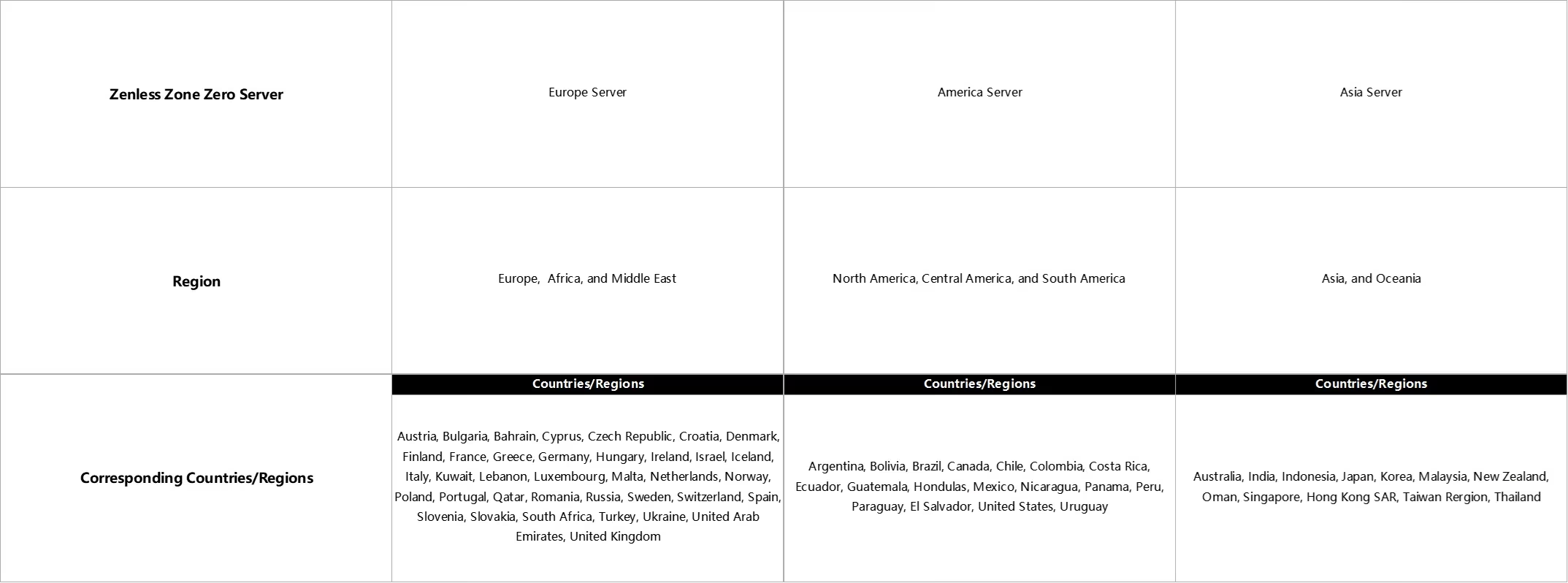
Zenless Zone Zero on PS5 supports the America, Europe, and Asia servers. There is no PS5 counterpart for the Taiwan/Hong Kong/Macau server. PS5 game servers are assigned according to the region of the PSN account, and players cannot choose their own server at this time.
| PSN Account Region | Assigned ZZZ Server on PS5 |
|---|---|
| North America | America |
| Europe | Europe |
| Hong Kong / Taiwan | Asia |
For more detail, players are advised to check the official region table or contact PlayStation Support.
Linking PSN and HoYoverse IDs
The linking process depends on a player's history. Those who already have a HoYoverse ID can select 'Login with existing HoYoverse ID' when first booting the game on PS5, then follow the prompts to link it with their PSN account. Those without one can choose 'Create HoYoverse ID now' and start fresh.
If a PSN account has previously been used to play any HoYoverse game on PlayStation, Zenless Zone Zero will automatically log in to the HoYoverse ID already linked to that PSN account. No extra linking is needed.
Why Progress May Not Sync
There are three common scenarios when PS5 progress does not appear on PC or mobile:
-
Wrong HoYoverse ID linked. The PSN account may be connected to a different HoYoverse ID than the one used on PC or mobile. Players can check the linked ID in-game under Options > Account > User Center.
-
Region mismatch. The PSN account and the server where the character was created may belong to different regions.
-
Taiwan/Hong Kong/Macau server character. PS5 progress syncing is only supported on American, European, and Asian servers. A PSN account registered in Hong Kong or Taiwan will automatically be assigned to the Asian server.
If a player needs to switch to another HoYoverse ID, they can create a new PSN account in the same region as their character's server, or unlink the current PSN account and re-link. But hold your horses before unlinking: each HoYoverse ID can only be unlinked once from a PSN account. Unlinking does not delete game progress, but data will no longer be shared with the PSN account, and that HoYoverse ID cannot save progress to PlayStation Network afterward.
To unlink, the HoYoverse ID must first be linked to an email address. The process is handled through Account Safety Settings in the HoYoverse account center.
Payments and Purchases
After linking, top-up items such as Monochromes and Inter-Knot Memberships can be used across platforms. When switching devices, all items received from top-ups will display and function normally.
There is one notable exception: characters created on PS5 can be topped up via PS5, PC, or the official website, but not through mobile. Pre-Order Bundles purchased on PS5 are sent to the character under the HoYoverse ID used when first logging in on PS5. To ensure correct delivery, players should confirm they are on the right character and that the Mail function is unlocked.
Bundles and items bought through the PlayStation Store can be claimed once certain conditions are met. PS5 Pre-Order Bundles and ZZZ City Entry Packs require unlocking Mail during the Prologue 'Business x Strangeness x Justness.' Monochromes, Inter-Knot Membership, and other items are claimed the first time a player visits the Random Play video store.
Friends Across Platforms
On PS5, Zenless Zone Zero shows two friends lists. 'Game Friends' includes friends made in-game across any platform. 'Friends From PlayStation Network' shows PSN friends who have played ZZZ on the same server, as well as friends who have not played yet. That second list only appears on PlayStation.
Game Friends can chat, view profiles, and be added to the PSN friends list. Friends from PlayStation Network can have their profiles viewed and be added to Game Friends. Cross-platform friendships are fully supported: Proxies on PC, mobile, and PS5 can all add one another as Game Friends. Online IDs from the PSN list can be viewed when both players are logged into PlayStation.
The Bottom Line for 2026
Keeping PSN, HoYoverse, and server regions aligned is no small feat, especially for players who began on one platform and later moved to another. Still, the system is designed to let Proxies carry their New Eridu life across devices without starting over. The safest approach is to confirm the linked HoYoverse ID, check the server region, and think carefully before unlinking. With those pieces in place, cross-platform play remains as smooth as a well-timed dodge.